
Play Simpsons Hit and Run Online
Start the campaign or drive around Springfield in this fan-made browser version.
Loading the game. The first visit may take longer while your browser fetches the files.
HelpHow to Play
Wait for the game menu
The game begins loading as soon as this page opens. Let the title screen finish loading before using the controls. The first visit can take longer because the browser has to fetch the engine and game assets.
Select Start
Click inside the game to give it keyboard focus, then select Start in the game menu. If pressing a key scrolls this page, click inside the game again. This often happens after checking controls or switching browser tabs.
Choose New Game
Select New Game to open the campaign and follow the instructions in the first mission. If the menu offers Continue, select it to resume a saved run. Choose Free Drive when you want time to get used to steering without a story objective. If the opening video shows Play or Skip, choose either to reach the first mission.
Browser Controls
These controls apply to the Vheissu web version. The same movement keys work on foot and in a car. Space changes function when you get behind the wheel, and E is used both to interact and to enter or leave a vehicle.
On foot
- Walk
- W A S D↑ ↓ ← →
- Run
- Shift
- Jump / double jump
- Space
- Interact or enter a vehicle
- E
- Kick
- F
Driving
- Drive and steer
- W A S D↑ ↓ ← →
- Handbrake
- Space
- Get out of the car
- E
- Return to the road and repair
- R
- Change camera / look behind
- CB
Menus and missions
- Pause or resume
- Esc
- Retry a failed mission
- Enter
Touchscreens
The project provides touch driving controls. Rotate the phone sideways before starting so you can see more of the game menu and driving area. If you struggle to reach a menu item, a desktop browser and keyboard are the more predictable setup.
Gamepads
Standard steering and trigger input is supported by the upstream project. Keep a keyboard or pointer available for menus, which have limited gamepad navigation. Click inside the game after using the page toolbar so input goes back to the player.
About the Hit and Run Browser Version
The Simpsons: Hit and Run runs here through Vheissu’s fan-made Three.js reconstruction, which uses converted PS2 assets and mission scripts. Choose a new campaign or resume a saved run from the in-game menu. Free Drive lets you explore Springfield without a story objective.
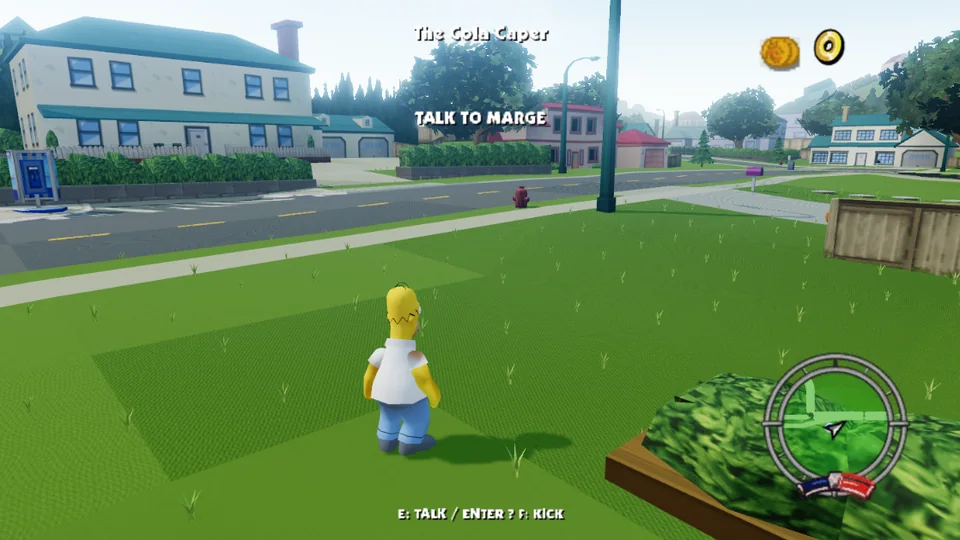
A new run starts with The Cola Caper in Evergreen Terrace. Follow the objective at the top of the screen and check the minimap for the next marker. Free Drive gives you room to test the handbrake, camera and vehicle recovery before tackling a timed objective. On foot, approach a vehicle or doorway and press E when the interaction prompt appears.
The reconstruction includes scripted story missions, bonus missions and street races. A retry returns you to the relevant mission flow, and the upstream project describes saves that resume from a recent mission checkpoint. Full playthrough testing is still in progress. Collectible-card gameplay and some traffic and menu behavior are still being developed, so timing or behavior can differ from what you remember.
The options menu is useful if the browser game feels sluggish. Try a lower graphics setting when the option is accessible, and judge it during driving rather than just on the title screen. The project documentation tracks the implementation and remaining differences, including the state of missions, input support and saving.
Help with Loading and Saves
The game runs in a separate frame. Start with the symptom you see and keep the same game tab open while checking the controls or display settings.
The game stays on a blank screen or keeps loading
Give a first visit time to fetch its files. If the screen never reaches the menu, check your connection and confirm hardware acceleration is enabled in a current browser with WebGL support. Open the original page to see whether the same problem occurs there. If it only fails inside this site, browser privacy settings or a content blocker may be affecting the embedded page. The reload button restarts the current game frame.
The keyboard scrolls the page instead of moving the player
Click inside the game before trying WASD or the arrow keys again. Browser focus can return to this page after you use Fullscreen, follow a help link, or move to another tab. If you are in a menu, choose the on-screen action with a pointer. Once the scene is visible, try a movement key and check whether the camera follows your character or car.
There is no sound or the game stutters
Interact with the game first, then check the in-game sound setting and make sure the browser tab is audible. If driving feels slow, use a lower quality setting in the game options when available, and close other graphics-heavy tabs. Fullscreen can make text easier to read. Returning to the smaller player can help if the larger view is less responsive.
My save does not appear under Continue
Return in the same browser profile and use the same way of opening the game as before. Storage inside the embedding page may be isolated from storage on the original game page. Private windows, clearing site data, and some tracking protections can also affect access to progress. If Continue appears but starts earlier than expected, the upstream save may have resumed the latest recorded mission checkpoint.
Frequently Asked Questions
Can I play The Simpsons: Hit and Run online?
Yes. The game at the top of this page is the Vheissu browser reconstruction. Wait for its menu, then select Start and New Game to begin the campaign. If you only want to practice moving and driving, use Free Drive when it is shown. The Controls section lists the keyboard inputs for each mode.
Do I need to install anything?
A compatible browser can load this version without a separate installation. It still downloads the files the game needs, which can make the first load slower on a busy connection. Keeping the tab open during the first load gives it time to fetch resources. After the menu appears, start the game using its own controls.
Can I play on my phone or use a controller?
Vheissu provides touch controls for driving and basic steering and trigger input on standard gamepads. Small screens, performance and menu input can affect whether you can get through a full session comfortably. Try landscape on a phone. If the menu does not respond to the controller, use a pointer or keyboard to select an option.
Does the game save my progress?
The browser build can save progress locally and resume via Continue. The project describes mission checkpoints and saved progress such as coins, purchases and completed objectives. Check for Continue in the same browser profile and from the same page where you played. A private window, a different device, or the original page opened separately can have different storage.
Is this the complete original game?
This is a fan-made reconstruction with the campaign, bonus missions and races. The project documents work that is still ongoing, including full-run testing, collectible-card gameplay, and aspects of traffic and menus. For questions about a feature you remember from the console, look at the project's current notes before assuming the browser version behaves the same way.